


This would enable you to reach people and various other companies. Advertisement on LinkedIn has a big impact on your business. You can even get tied up with a digital marketing company in Delhi to get more traffic, generate leads, and build brand awareness using LinkedIn ads.
For placing advertisements on LinkedIn, you need to be clear on the LinkedIn ad types and formats. So, let us discuss a few popular ones here.
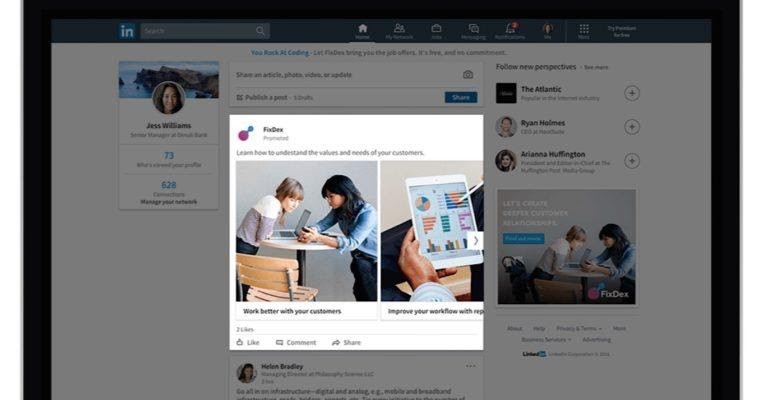
1. Sponsored Content Or Direct Sponsored Content
- Cost per click model
- Cost per thousand impressions model
When To Use This Linkedin Ad:
- These ads can be used when you require more leads to get more engagement as they go into the direct news feed of the users.
- As these ads have more images and large text, it would trigger users to click on it so that it would go to the landing page and to bring more brand awareness.
- When you wish to get additional people to visit your content, this ad would be effective.
- Using this LinkedIn ad type, you can advertise with an image or video.
- When you want to raise awareness for any of your company events or initiatives
- Increase quality traffic to posts
2. Sponsored InMail
Content can be modified to the users and including a responsive design makes sure that your call-to-action button is visible. A/B Testing is used to execute many variations to the ad. Sponsored InMail contains the following parts:
- Customer greeting
- Body text
- Call-to-action button
- Links to the message body
When To Use This Linkedin Ad:
- This is a personalised LinkedIn ad type as you send a direct message to your target audience who is also a LinkedIn user. This would eventually lead to conversion and is for sure delivered.
- Sponsored InMail goes to LinkedIn users only when they are online, hence it gets a place on the top of the inbox.
- When you want to follow the download of assets
- To generate B2B leads
- To direct engagement with valuable connections

3. Text Ads
- Cost per click model
- Costs per thousand impressions model
When To Use This Linkedin Ad:
- These are quick run ads and easy to set up and manage
- These increase brand awareness
- To drive more website traffic or exact landing page
- To attract job aspirants
- To set up computable campaigns with a conversion tracking

4. Dynamic Ads
Dynamic ads get displayed on the desktop only on the right rail. LinkedIn users can send their details like name and email ids straight in the dynamic ads without typing it. When the users submit their respective information in the dynamic ads, the content downloads automatically.
Dynamic ads exist in the following formats:
- Follower ads
- Spotlight ads
- Job ads
- Content ads
When To Use This Linkedin Ad:
- Highly engaging ads and effective to get more traffic to a landing page
- Mainly effective to advertise job openings
- To get users to follow your LinkedIn account of your company page
- Increase leads

5. Leads Gen Forms
Reasons to use this LinkedIn Ad:
- The LinkedIn users need not leave LinkedIn to fill the form
- Select the fields of the form to create custom fields

6. Elevate
To Find Whether To Execute The Linkedin Ads
Find Out The Budget For Linkedin Ads
Find out the goal for LinkedIn Ads usage
So, check with the main metrics that create a big impact. Also, you need to check that your audiences are available on the LinkedIn platform. As digital marketers, you need to continuously focus on the ways that you could provide your best to your audiences. Before you set your ad, consider your target audience. Target them basis company, location, skill, industry, title, and so on.